

UI/UX Design vs Web Design: What Should You Learn First?
If you are planning to build a career in the digital design industry, you may have come across two popular terms: UI/UX Design and Web Design. Both fields involve creativity, technology and digital experiences, but they are not exactly the same.
So, should you learn UI/UX Design or Web Design first?
The answer depends on your career goal. If you want to learn how websites are planned, designed and built, Web Design can provide a strong foundation. If you are more interested in user behaviour, interfaces, app experiences and usability, UI/UX Design may be the better direction.
For students looking for a Web Design Course in Bardhaman, understanding the difference between these fields can make it easier to choose the right learning path.
At Moople Bardhaman, the focus is on combining creative skills with modern technology and practical learning. The institute currently offers a Web Design & AI program and showcases student web projects as part of its learning environment.
UI/UX Design vs Web Design: What Is the Difference?
The simplest way to understand the difference is:
Web Design focuses primarily on designing websites and their visual structure, while UI/UX Design focuses on how digital products look, feel and work for users.
There is considerable overlap between the two.
A web designer may work on:
Website layouts
Typography
Colours
Images and graphics
Responsive design
Navigation
Landing pages
Website interfaces
A UI/UX designer may work on:
User research
User journeys
Wireframes
Prototypes
Information architecture
Interface design
Usability
Interaction patterns
Design systems
In modern projects, a professional may even work across both areas.
What Is Web Design?
Web Design is the process of planning and creating the visual structure and user-facing experience of a website.
A web designer considers how a website should look, how information should be arranged and how visitors should navigate between pages.
For example, when designing a business website, a web designer may decide:
Where the logo should appear
How the navigation menu should work
Where the headline and CTA should be placed
How images should be displayed
Which fonts and colours should be used
How the page should look on mobile devices
How different sections should be arranged
Web design can also involve technical knowledge such as HTML, CSS, JavaScript fundamentals, responsive design and website platforms such as WordPress.
This makes Web Design a useful starting point for students who want to understand the complete website creation process.
What Is UI Design?
UI stands for User Interface.
UI Design focuses on the visual elements users interact with on a website, application or digital product.
These can include:
Buttons
Menus
Forms
Icons
Cards
Navigation elements
Typography
Colours
Spacing
Interactive states
A UI designer's goal is to create an interface that is visually consistent, understandable and easy to interact with.
For example, designing an attractive and intuitive checkout screen for an e-commerce website is a UI design task.
What Is UX Design?
UX stands for User Experience.
UX Design focuses on the overall experience a person has while using a website, app or digital product.
Instead of asking only:
"Does this website look good?"
UX designers also ask:
"Can users accomplish what they came to do easily?"
UX work can include:
Understanding user needs
Creating user personas
Mapping user journeys
Organising information
Creating wireframes
Testing designs
Identifying usability problems
Improving navigation
For example, if visitors regularly abandon an online registration process because it is confusing, a UX designer may analyse the journey and redesign the process to make it simpler.
Web Design vs UI/UX Design: Key Differences
|
Area |
Web Design |
UI/UX Design |
|
Primary focus |
Websites |
Websites, apps and digital products |
|
Visual design |
Very important |
Important, especially UI |
|
User research |
Usually limited |
Major UX component |
|
Wireframing |
May be used |
Common |
|
Prototyping |
May be used |
Common |
|
HTML/CSS |
Often useful |
Not always required |
|
Responsive design |
Important |
Important |
|
User testing |
May be involved |
Important |
|
Figma |
Useful |
Widely used |
|
Coding |
Useful depending on role |
Not always necessary |
|
Main goal |
Effective website design |
Better overall user experience |
The two disciplines are therefore different, but they complement each other.
Should You Learn Web Design or UI/UX First?
For most beginners, learning Web Design first can be a practical foundation, especially if you want to understand how websites are structured and created.
However, that does not mean UI/UX should be ignored.
A strong learning path can be:
Design Fundamentals → Web Design → UI/UX → Figma → Responsive Design → HTML & CSS → Projects → Portfolio
This approach helps students understand both the creative and practical sides of digital experiences.
If your objective is specifically to become a UI/UX Designer, you can also begin directly with UI/UX fundamentals and gradually learn web technologies.
Choose Web Design First If You Want To...
A Web Design Course in Bardhaman may be a good starting point if you:
Enjoy creating website layouts
Like visual design
Want to understand HTML and CSS
Want to build responsive websites
Are interested in WordPress
Want to design landing pages
Want to work with websites for businesses
Are considering freelance web design
Want to move towards front-end development later
Web design can provide a broad foundation before you specialise.
Choose UI/UX First If You Want To...
A UI/UX Design Course in Bardhaman may be more suitable if you:
Enjoy solving user problems
Are interested in user behaviour
Like wireframes and prototypes
Enjoy interface design
Want to design mobile apps
Like conducting usability research
Are interested in product design
Prefer design thinking over coding
UI/UX can be particularly attractive to students who enjoy combining creativity, psychology, research and technology.
Do Web Designers Need UI/UX Skills?
Yes, having UI/UX knowledge can make a web designer more effective.
Modern websites are not designed only to look attractive. They also need to be easy to understand and use.
For example, a beautiful website can still perform poorly if:
Navigation is confusing
Buttons are difficult to find
Text is hard to read
Forms are unnecessarily complicated
Mobile layouts are difficult to use
Important information is hidden
Understanding basic UX principles helps web designers create websites that are not only attractive but also useful.
Do UI/UX Designers Need Coding Skills?
Not necessarily.
A UI/UX designer can work without becoming a professional programmer. However, understanding basic web technologies can be extremely useful.
Knowledge of HTML and CSS helps designers understand:
What is technically possible
How layouts behave
How responsive designs work
How spacing and typography translate into real websites
How to communicate with developers
Therefore, UI/UX students can benefit from learning basic web technology even if they do not plan to become developers.
Why Figma Is Important for Both Web Design and UI/UX
Figma has become an important tool in modern digital design workflows.
Designers can use it to create:
Wireframes
Website layouts
UI designs
Prototypes
Design systems
Mobile interfaces
Interactive demonstrations
For a student pursuing Web Design Training in Bardhaman, learning Figma alongside website design fundamentals can help create professional-looking project work.
For UI/UX students, Figma is particularly useful because it supports the process from early wireframes to interactive prototypes.
What Should a Beginner Learn First?
If you are completely new to digital design, avoid trying to learn everything simultaneously.
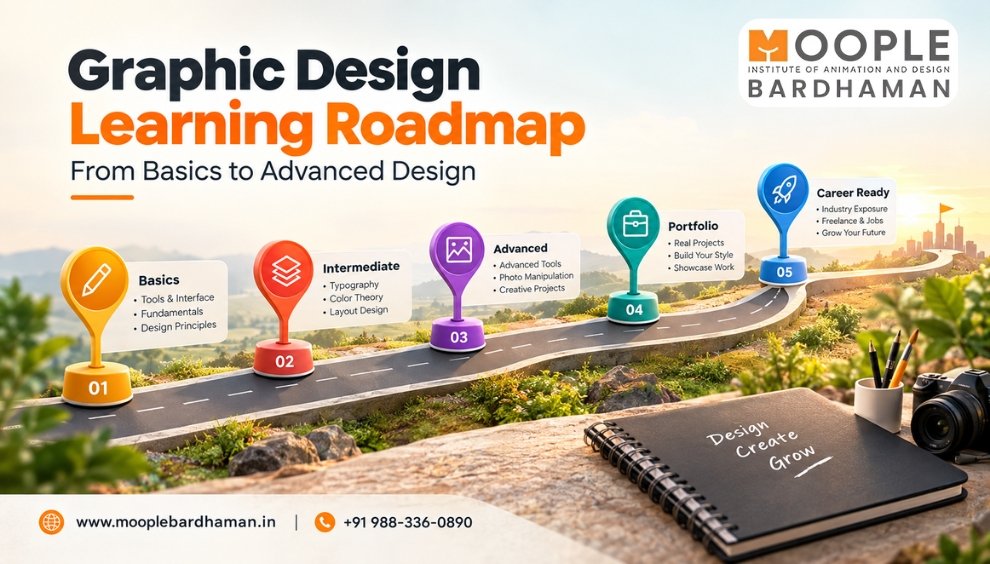
A practical beginner roadmap could look like this:
Step 1: Learn Design Fundamentals
Start with:
Colour theory
Typography
Composition
Visual hierarchy
Spacing
Alignment
Step 2: Learn Web Design Principles
Understand:
Website structure
Navigation
Landing pages
Responsive layouts
Content hierarchy
Calls to action
Step 3: Learn Figma
Practise:
Frames
Components
Auto Layout
Prototypes
Responsive layouts
Step 4: Learn HTML & CSS
You don't necessarily need advanced programming initially. Learn enough to understand how website designs are translated into web pages.
Step 5: Create Real Projects
Build projects such as:
Restaurant website
School website
Portfolio website
E-commerce homepage
Local business website
Travel website
Landing page
Step 6: Build Your Portfolio
A portfolio demonstrates what you can actually create.
Instead of filling it with dozens of incomplete designs, focus on a few strong projects and explain:
Problem → Research → Design → Solution → Final Result
This approach can make your portfolio more meaningful to potential employers and clients.
Can Web Design and UI/UX Be Learned Together?
Absolutely.
In fact, learning both can provide a broader understanding of digital product creation.
For example:
UI/UX → Understand the user
Web Design → Design the website
HTML/CSS → Understand the web technology
Figma → Plan and prototype the interface
Together, these skills can help students approach projects more confidently.
This is particularly useful for learners who want to work in digital agencies, design studios, startups or freelance projects.
Career Opportunities After Learning Web Design and UI/UX
Students can explore several career paths after developing relevant skills.
Possible roles include:
Web Designer
UI Designer
UX Designer
UI/UX Designer
WordPress Designer
Front-End Designer
Web Design Intern
Product Designer
Freelance Web Designer
Digital Design Professional
The exact role depends on the student's skills, portfolio, experience and specialization.
Moople Bardhaman's existing career-focused Web Design content also highlights roles such as Web Designer, UI Designer, UX Designer, Front-End Developer, WordPress Designer and Freelance Web Designer.
Why Choose Moople Bardhaman for Web Design & AI Training?
Moople Bardhaman offers a Web Design & AI course as part of its creative and technology-focused training programs. Its website also showcases student web projects, giving prospective students an opportunity to see examples of practical work.
The institute's broader approach focuses on combining creativity, technology and practical learning. Its placement section also describes career support and industry-oriented training.
For someone considering Web Design Training in Bardhaman, the ideal approach is to look beyond certificates and focus on whether the training helps you develop skills that can actually be demonstrated through projects and a portfolio.
Have the Creativity? Build the Skills.
If you are completely new to digital design, Web Design can be an excellent foundation, particularly if your goal is to understand websites from design to implementation.
Once you understand the fundamentals, adding UI/UX, Figma, responsive design and basic HTML/CSS can expand your skill set considerably.
The best path is not necessarily:
Web Design OR UI/UX
It can be:
Web Design + UI/UX + Figma + Basic Web Technology
This combination can help you understand both how a website looks and how people experience it.
If you are looking for a practical Web Design Course in Bardhaman, explore the Web Design & AI program at Moople Bardhaman, compare the curriculum and focus on building real projects that can become part of your professional portfolio.
FAQs
1. Which is better, Web Design or UI/UX Design?
Neither is universally better. Web Design is suitable for people interested in creating websites, while UI/UX is more focused on interfaces, usability and user experiences. Beginners can benefit from learning Web Design fundamentals alongside UI/UX principles.
2. Can I learn UI/UX after completing a Web Design Course?
Yes. Web Design can provide useful knowledge about layouts, responsive design, typography and website structure before you specialise in UI/UX.
3. Is coding required for UI/UX Design?
Advanced coding is not usually required for UI/UX design. However, understanding basic HTML and CSS can help designers communicate better with developers and understand technical limitations.
4. Is Web Design a good career for beginners?
Yes. Beginners can start by learning design fundamentals, responsive design, HTML, CSS, design tools and practical website creation. Building a strong portfolio is also important.
5. Is Figma useful for Web Design?
Yes. Figma can be used to create website layouts, wireframes, prototypes, UI designs and design systems.
6. Can I learn Web Design after Class 12?
Yes. Students can start learning web design after completing Class 12. A beginner-friendly course can introduce design concepts and technical skills step by step.
7. Can Web Designers work as freelancers?
Yes. Web designers can offer services to businesses, startups, agencies and individual clients. A strong portfolio and good communication skills are important for attracting freelance projects.
8. Where can I learn Web Design in Bardhaman?
Students searching for a Web Design Course in Bardhaman can compare institutes based on practical training, curriculum, software, projects, portfolio development, mentorship and career support. Moople Bardhaman offers a Web Design & AI program and practical creative training.